Choice Limiter, Form Limiter & Live Sheet Sync — in one clean sidebar.
Stop double-booked time slots, silent sync failures, and surprise submission cutoffs. FormCap runs deterministically inside Google Apps Script with zero bloated menus and transparent $5/mo Pro pricing.
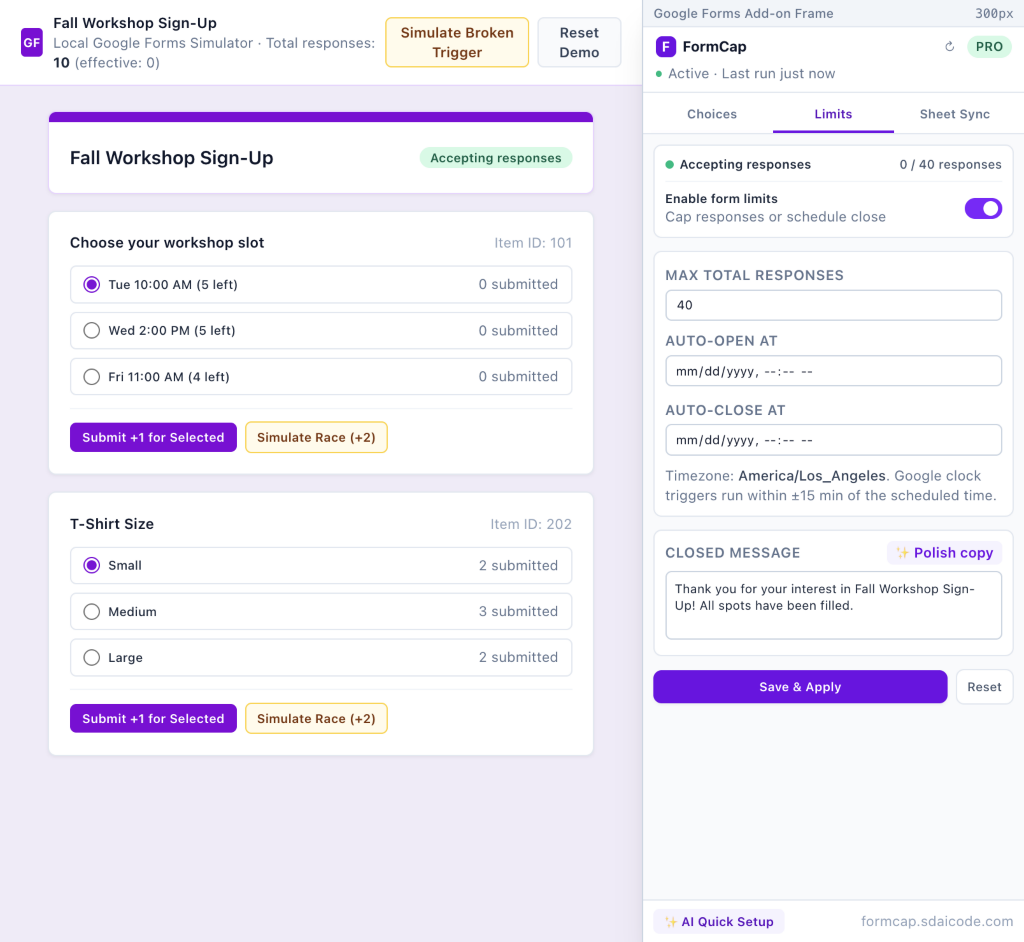
Three core tools. Zero silent breakages.
Engineered around immutable Google Form Item IDs, Apps Script locks, and built-in trigger health checks.
Per-Choice Limits & Waitlist
Cap Multiple Choice, Dropdown, and Checkbox options individually or globally. Renaming a question never breaks rules, go-to-section branching stays intact, and concurrent overbooking races are automatically flagged in the sidebar.
Response Caps & Schedule Windows
Automatically close your Google Form at a max total response count or exact date/time with a custom closed message — or schedule a full Auto-Open and Auto-Close registration window.
Live Google Sheet → Form Sync
Paste any Google Sheet URL (or 1-click use the form’s linked Sheet) to keep options and per-choice seat caps synchronized — manually, on every submission, or hourly — without ever reopening already-full slots.
Simple, honest pricing
We never silently freeze a live Free form at 20 responses. Limits apply only to advanced automation features.
- ✓ 1 active choice-limited question (unlimited options & responses)
- ✓ Whole-form Max Total Responses or Auto-Close date/time
- ✓ Unlimited Manual Sheet-to-Form syncs
- ✓ Trigger health check & 1-click repair
- ✓ 3 AI Quick Setup & Copy Polish tries
- ✓ Unlimited choice-limited questions across unlimited forms
- ✓ Auto Sheet Sync (On Submit & Hourly) + Sheet Cap Column
- ✓ Waitlist fallback & “(N left)” remaining-seat badges
- ✓ Scheduled Auto-Open + Auto-Close windows
- ✓ Unlimited AI Quick Setup & Closed Message polish
100% of live form submission counts, choice updates, and Sheet syncs run deterministically inside Google Apps Script — respondent answers and respondent PII never leave Google. Optional setup-time AI Quick Setup sends only question titles and option labels (never responses) and is never used for AI/ML model training. FormCap uses only 4 narrow Sensitive OAuth scopes (zero Google Drive or Gmail scopes). Read full Privacy Policy →
Frequently Asked Questions
No. FormCap binds every rule to the question’s immutable Google Form Item ID rather than its title text.
Yes. Whenever choices are updated, hidden, or annotated with seats-left badges, FormCap preserves each option’s page navigation rule.
Google Forms does not live-refresh open respondent tabs. FormCap serializes updates using Apps Script locks and immediately flags any millisecond race in the sidebar Overbooking Alert banner so you see it right away.
Click the green PRO pill in the FormCap sidebar and choose Manage Subscription (Stripe Portal) to cancel or update billing anytime. Need help? Email sdai.code@gmail.com.